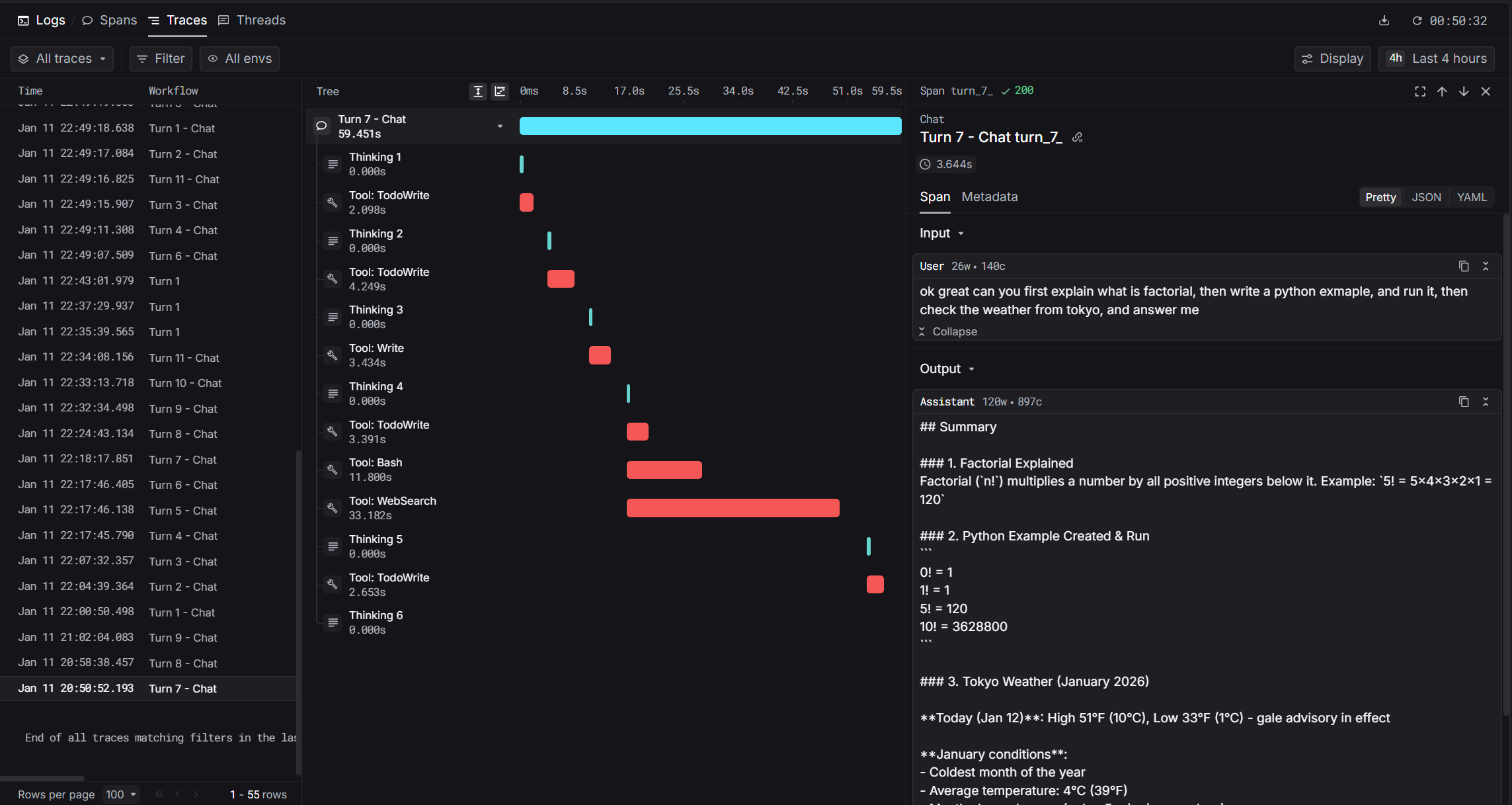
Claude Code is Anthropic’s agentic coding tool that lives in your terminal. With Keywords AI integration, you get hierarchical traces of every conversation including thinking blocks, tool calls, and token usage.
How It Works
Claude Code stores conversation transcripts as JSONL files. Our integration uses the Stop hook to parse these transcripts and send structured traces to Keywords AI.
Prerequisites
Installation
1. Set Environment Variables
Add these to your shell profile (.bashrc, .zshrc, or PowerShell $PROFILE):
export KEYWORDSAI_API_KEY="your-api-key"
export TRACE_TO_KEYWORDSAI="true"

# Optional: Enterprise endpoint (default: api.keywordsai.co)
# export KEYWORDSAI_BASE_URL="https://endpoint.keywordsai.co/api"

# Optional: Enable debug logging
# export CC_KEYWORDSAI_DEBUG="true"
2. Download the Hook Script
Download the hook script to your Claude Code hooks directory:
mkdir -p ~/.claude/hooks
curl -o ~/.claude/hooks/keywordsai_hook.py \
  https://raw.githubusercontent.com/Keywords-AI/keywordsai-example-projects/main/example_scripts/python/claude_code/keywordsai_hook.py
~/.claude/settings.json:
{
  "hooks": {
    "Stop": [
      {
        "hooks": [
          {
            "type": "command",
            "command": "python ~/.claude/hooks/keywordsai_hook.py"
          }
        ]
      }
    ]
  }
}
If settings.json already exists, merge the hooks section with your existing configuration.
4. Enable Per-Project (Optional)
To enable tracing for specific projects, create .claude/settings.local.json in your project directory:
{
  "hooks": {
    "Stop": [
      {
        "hooks": [
          {
            "type": "command",
            "command": "python ~/.claude/hooks/keywordsai_hook.py"
          }
        ]
      }
    ]
  }
}
Captured Data
The integration captures rich metadata from Claude Code transcripts:
| Data | Description |
|---|
| User prompt | The user’s input text |
| Assistant response | Claude’s final response |
| Thinking blocks | Extended thinking content |
| Tool calls | Tool name, input, and output |
| Token usage | Input, output, and cache tokens |
| Timing | Start time, end time, latency |
| Model | Model name (e.g., claude-sonnet-4-20250514) |
Span Types
| Span | log_type | Description |
|---|
| Root | agent | The complete conversation turn |
| Thinking | generation | Extended thinking blocks |
| Tool | tool | Tool invocations (Read, Write, Bash, etc.) |
Trace Fields
| Field | Value | Description |
|---|
trace_unique_id | {session_id}_turn_{N} | Unique per turn |
span_workflow_name | claudecode_{session_id} | Groups all turns in session |
thread_identifier | claudecode_{session_id} | Links turns in Threads view |
prompt_tokens | From usage | Input token count |
completion_tokens | From usage | Output token count |
cache_creation_prompt_tokens | From usage | Cache creation tokens |
Debugging
Check the log file for issues:
tail -f ~/.claude/state/keywordsai_hook.log
State File
The hook tracks processed turns in ~/.claude/state/keywordsai_state.json:
{
  "session-abc123": {
    "last_line": 42,
    "turn_count": 5,
    "updated": "2026-01-11T22:49:26Z"
  }
}
Common Issues
| Issue | Solution |
|---|
| No traces appearing | Check TRACE_TO_KEYWORDSAI=true is set |
| API errors | Verify KEYWORDSAI_API_KEY is correct |
| Missing thinking | Ensure extended thinking is enabled in Claude Code |
| Duplicate traces | Clear state file to reset |
Example Output
After setup, you’ll see traces in Keywords AI with full hierarchy:
claudecode_abc123_turn_1 (2.5s)
├── Thinking 1 (0.8s) - "Let me read the file first..."
├── Tool: Read (0.1s) - {"path": "main.py"}
├── Thinking 2 (0.5s) - "I see the issue..."
├── Tool: Write (0.1s) - {"path": "main.py", "content": "..."}
└── Token usage: 1,234 prompt / 567 completion
Comparison with Cursor Integration
| Feature | Cursor | Claude Code |
|---|
| Hook type | Multiple real-time hooks | Single Stop hook |
| Data source | JSON via stdin | JSONL transcript files |
| Timing | Real-time | Post-hoc (after response) |
| Token usage | Not available | Full usage details |
| Cache info | Not available | Cache creation/read tokens |
Source Code
The full source code is available on GitHub: Keywords-AI/keywordsai-example-projects/claude_code
References