Make sure you have an OpenTelemetry TracerProvider with a SpanProcessor configured before running your agent (otherwise spans will not be exported).
Overview
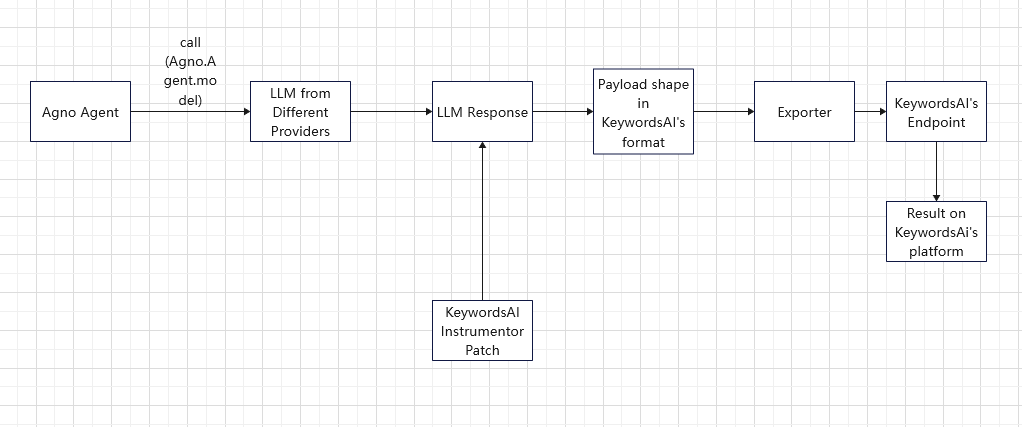
Use the Keywords AI Agno exporter to capture Agno spans (via OpenInference + OpenTelemetry) and send them to Keywords AI tracing.
Quickstart
Step 1: Get a Keywords AI API key
Create an API key in the Keywords AI dashboard.
Step 2: Install packages
pip install agno openinference-instrumentation-agno keywordsai-exporter-agno
Step 3: Set environment variables
Create a .env or export environment variables:
# Required
KEYWORDSAI_API_KEY=your-keywordsai-api-key

# Optional (gateway calls)
KEYWORDSAI_GATEWAY_BASE_URL=https://api.keywordsai.co/api

# If you want to call OpenAI directly (without the Keywords AI gateway), you also need:
OPENAI_API_KEY=your-openai-api-key
OPENAI_MODEL=gpt-4o-mini
Step 4: Instrument + run an agent
This quickstart:
- configures an OpenTelemetry
TracerProvider and a SpanProcessor (required to export spans)
- instruments Agno spans (OpenInference)
- exports Agno spans to Keywords AI tracing ingest
- routes LLM calls through the Keywords AI gateway
import os

from agno.agent import Agent
from agno.models.openai import OpenAIChat
from openinference.instrumentation.agno import AgnoInstrumentor
from opentelemetry import trace as trace_api
from opentelemetry.sdk import trace as trace_sdk
from opentelemetry.sdk.trace.export import SimpleSpanProcessor
from opentelemetry.sdk.trace.export.in_memory_span_exporter import InMemorySpanExporter

from keywordsai_exporter_agno import KeywordsAIAgnoInstrumentor

def main():
    keywordsai_api_key = os.getenv("KEYWORDSAI_API_KEY")
    if not keywordsai_api_key:
        raise RuntimeError("KEYWORDSAI_API_KEY not set")

    # Keywords AI gateway base URL
    gateway_base_url = os.getenv("KEYWORDSAI_GATEWAY_BASE_URL", "https://api.keywordsai.co/api")

    # Ensure we have a TracerProvider and a SpanProcessor
    tracer_provider = trace_api.get_tracer_provider()
    if not isinstance(tracer_provider, trace_sdk.TracerProvider):
        tracer_provider = trace_sdk.TracerProvider()
        trace_api.set_tracer_provider(tracer_provider)

    # Keep it silent locally (no console exporter). Traces are still sent to Keywords AI.
    tracer_provider.add_span_processor(SimpleSpanProcessor(InMemorySpanExporter()))

    # Export Agno spans to Keywords AI
    KeywordsAIAgnoInstrumentor().instrument(
        api_key=keywordsai_api_key,
        base_url=gateway_base_url,
        passthrough=False,
    )

    # Create Agno spans (OpenInference)
    AgnoInstrumentor().instrument()

    agent = Agent(
        name="KeywordsAI Agno Quickstart Agent",
        model=OpenAIChat(
            id=os.getenv("OPENAI_MODEL", "gpt-4o-mini"),
            api_key=keywordsai_api_key,
            base_url=gateway_base_url,
        ),
    )

    # Optional: Call OpenAI directly (no Keywords AI gateway)
    # agent = Agent(
    #     name="Agno Agent (direct OpenAI)",
    #     model=OpenAIChat(
    #         id=os.getenv("OPENAI_MODEL", "gpt-4o-mini"),
    #         api_key=os.getenv("OPENAI_API_KEY"),
    #     ),
    # )

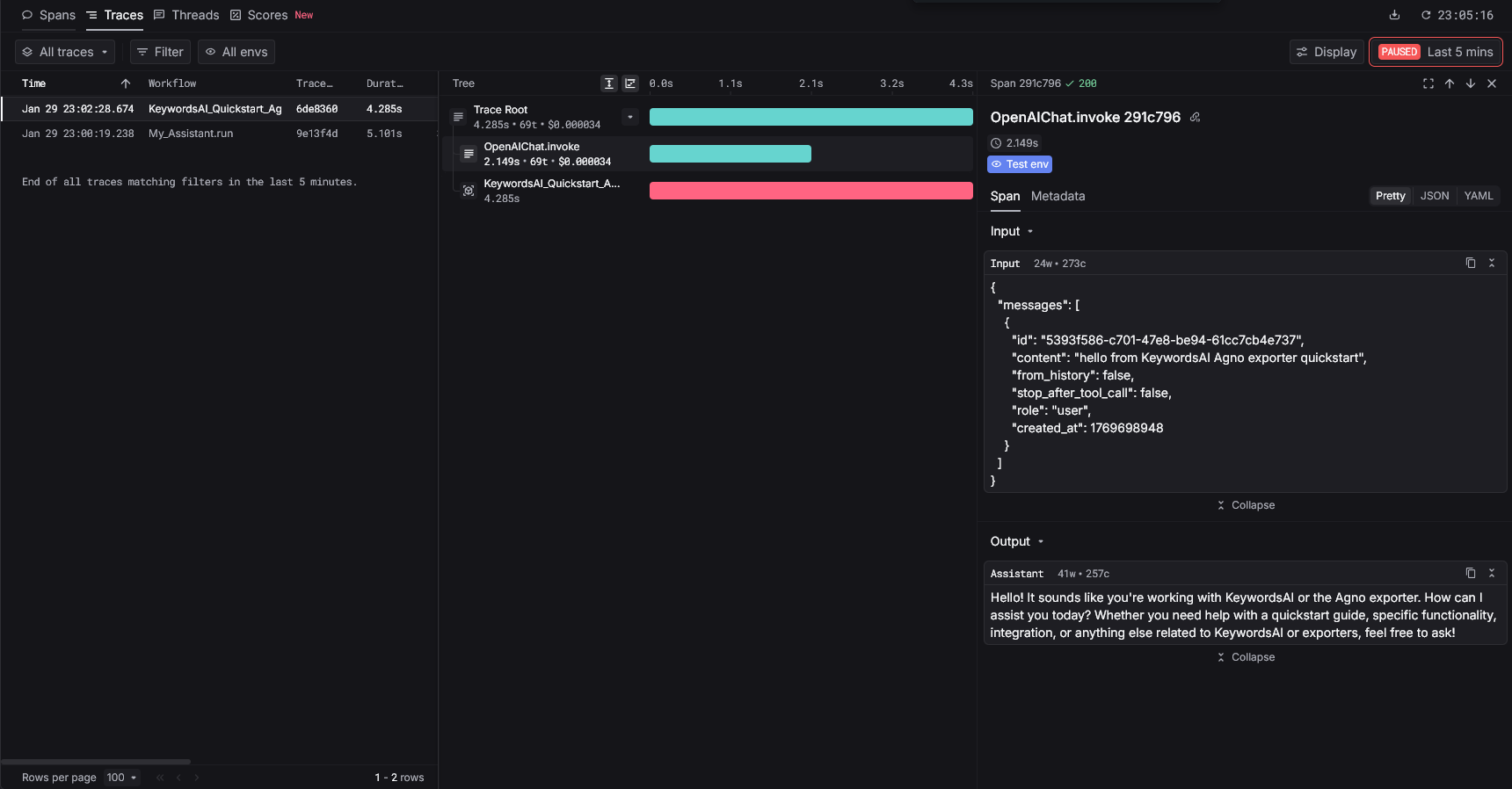
    agent.run("hello from KeywordsAI Agno exporter quickstart")
    tracer_provider.force_flush()


if __name__ == "__main__":
    main()
Call OpenAI directly (optional)
If you want to keep tracing to Keywords AI but call OpenAI directly (instead of routing LLM calls through the Keywords AI gateway), use your provider key on the model:
import os
from agno.agent import Agent
from agno.models.openai import OpenAIChat

agent = Agent(
    name="Direct OpenAI Agent",
    model=OpenAIChat(
        id=os.getenv("OPENAI_MODEL", "gpt-4o-mini"),
        api_key=os.getenv("OPENAI_API_KEY"),
    ),
)

agent.run("hello from Agno using OpenAI directly")