This integration is for workflow tracing. For gateway features, see Haystack Gateway.

Overview

Haystack pipelines can have multiple components (retrievers, prompt builders, LLMs). The Keywords AI tracing integration captures your entire workflow execution, showing you exactly how data flows through each component.
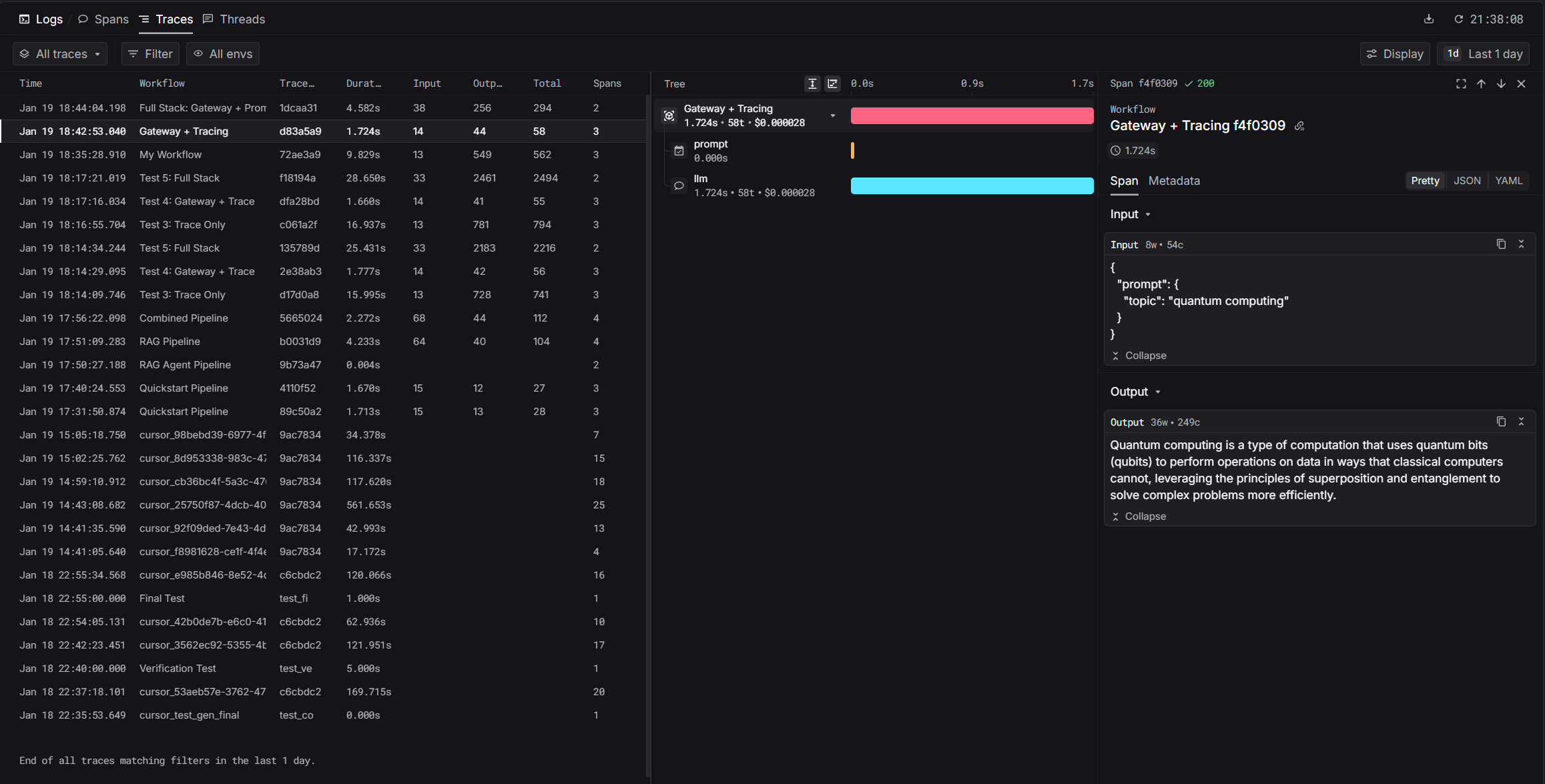
Haystack tracing visualization

Installation

pip install keywordsai-exporter-haystack

Quickstart

1

Set Environment Variables

export KEYWORDSAI_API_KEY="your-keywords-ai-key"
export OPENAI_API_KEY="your-openai-key"
export HAYSTACK_CONTENT_TRACING_ENABLED="true"
The HAYSTACK_CONTENT_TRACING_ENABLED variable activates Haystack’s tracing system.
2

Add KeywordsAIConnector to Your Pipeline

import os
from haystack import Pipeline
from haystack.components.builders import PromptBuilder
from haystack.components.generators import OpenAIGenerator
from keywordsai_exporter_haystack import KeywordsAIConnector

os.environ["HAYSTACK_CONTENT_TRACING_ENABLED"] = "true"

# Create pipeline with tracing
pipeline = Pipeline()
pipeline.add_component("tracer", KeywordsAIConnector("My Workflow"))
pipeline.add_component("prompt", PromptBuilder(template="Tell me about {{topic}}."))
pipeline.add_component("llm", OpenAIGenerator(model="gpt-4o-mini"))
pipeline.connect("prompt", "llm")

# Run
result = pipeline.run({"prompt": {"topic": "artificial intelligence"}})
print(result["llm"]["replies"][0])
print(f"\nTrace URL: {result['tracer']['trace_url']}")
3

View Your Trace

After running, you’ll get a trace URL. Visit it to see:
  • Pipeline execution timeline
  • Each component’s input/output
  • Timing per component
  • Token usage and costs
Dashboard: platform.keywordsai.co/platform/traces

Gateway Integration

For production workflows, combine tracing with gateway features like automatic logging, fallbacks, and cost optimization.

Haystack Gateway Integration

Learn how to route LLM calls through Keywords AI gateway